
You create a WhatsApp newsletter via the WhatsApp Business Platform, meaning the API, and an official provider. You verify your business with Meta, collect opt-ins, have a template approved and send it to a segment. On the Chatarmin platform, the median open rate of WhatsApp campaigns is 72% and the click rate is 12.0%. Here you will learn how to create a WhatsApp newsletter and use it for WhatsApp newsletter marketing, with a 5-step guide, costs and real examples.
What is a WhatsApp newsletter?
A WhatsApp newsletter is a marketing message you send via the WhatsApp Business Platform to contacts who have given consent. Every recipient gets the message as their own chat and can reply directly. This clearly sets it apart from WhatsApp Channels and the broadcast lists of the Business app.
| Feature | Broadcast list (Business app) | WhatsApp Channel | WhatsApp newsletter (API) |
|---|---|---|---|
| Recipients | Up to 256 per list, only people who saved your number | Unlimited, followers subscribe themselves | All contacts with opt-in, depending on messaging limit |
| Dialogue | 1:1 replies possible | One-way street | 1:1 dialogue with team inbox |
| Customer data | Smartphone address book | No numbers, no names | Full data in your tool and CRM |
| Segmentation and automations | Manual via labels | None | Segments, flows, triggers from shop and CRM |
| Tracking | Read receipts | Reach | Opens, clicks and revenue per campaign |
| Costs | Free | Free | Meta fee per message plus software |
Channels are suited to reach and brand awareness. For revenue and customer loyalty, the API is the way to go. Our article WhatsApp newsletter vs. channel explains the exact differences.
Why is the WhatsApp Business app not enough?
The Business app is built for individual chats. Beyond a few hundred contacts, you lack segments, tracking and connections to shop and CRM. Data protection adds to this: the app reads the smartphone's address book and also transfers numbers of people who have not given consent.
How well does a WhatsApp newsletter perform?
Around three quarters of recipients open a WhatsApp newsletter. That is a good three times the rate of a strong email campaign. The following figures come from our WhatsApp marketing benchmark with 382 brands from June 2025 to June 2026.
| KPI | Value | Basis |
|---|---|---|
| Open rate, median per brand | 72% | 414 brands, March to May 2026 |
| Open rate, weighted | 79.6% | 11.8 million delivered messages |
| Click rate | 12.0% | Clicks per delivered message |
| Revenue per campaign message | €1.03 | 49.3 million campaign messages |
In our data, no account reaches the often-quoted 98% open rate as a campaign average. If your brand is above 72%, you already beat half of all senders. Our open rate benchmark explains how we measure the open rate.
What do you need for a WhatsApp newsletter?
For a WhatsApp newsletter, you need five things. Verifying your business with Meta usually takes the longest.
- A phone number for your business, landlines also work.
- A verified Meta business portfolio with company details, website and an email address on your domain.
- An official provider (Business Solution Provider) through which you use the API.
- Contacts with an opt-in, meaning documented consent to receive advertising via WhatsApp.
- A data processing agreement (DPA) with your provider.
Create a WhatsApp newsletter: 5-step guide
This is how you get from the first setup to your first campaign. The order is the same with all official providers.
Step 1: Prepare your phone number
The number becomes your brand's permanent sender number and appears in every customer chat. Choose a number you want to keep for the long term. If your number already runs in the Business app, you can use it in parallel with the API via WhatsApp Coexistence.
Step 2: Verify your Meta business portfolio
The WhatsApp Business Platform runs through Meta. You need a business portfolio with admin rights and proof such as a commercial register extract. Meta compares company name, address, website and email domain.
Step 3: Choose and connect a provider
You use the API via an official provider that gives you an interface, segments and tracking. Look for hosting in the EU, a DPA and direct connections to your shop. At Chatarmin: hosting in the EU, servers in Germany. Our WhatsApp newsletter software shows what sending looks like in practice.
Step 4: Import and segment contacts
Only import contacts who have agreed to receive advertising via WhatsApp. An old email consent does not automatically apply to WhatsApp. Export the numbers from your shop or CRM, filter for mobile numbers and segment by purchase history, basket value and last order.
Start with your best customers. Your best customers respond most strongly and give you the most meaningful first figures. With Shopify or Klaviyo, segments and opt-ins stay in sync automatically.
Step 5: Submit a template and send your first campaign
Every marketing message to contacts outside an open chat is a template that Meta reviews beforehand. Keep it short, with a clear offer and one button.
Via the API, image headers are JPEG or PNG files of up to 5 MB. Our guide to WhatsApp image sizes shows which dimensions work best. Personalise with first name or favourite product and send to a segment instead of everyone.
Timing matters. According to our send time benchmark, campaigns sent at 10 am reach a 16.3% click rate, compared with 9.3% at 6 pm. We recommend two to four campaigns a month to keep the unsubscribe rate low.
How do you collect opt-ins for your WhatsApp newsletter?
You collect opt-ins wherever customers are in contact with your brand anyway. The clearer the benefit, the more sign-ups you get. These methods have proven themselves:
- Website pop-up with an incentive, such as early access or a voucher.
- Checkout checkbox with its own text for WhatsApp.
- QR code on packaging, inserts or in store.
- Chat link in email signatures, Instagram bios and email newsletters.
- Click-to-WhatsApp ads on Instagram and Facebook.
If someone writes via a Click-to-WhatsApp ad and you reply within 24 hours, all messages are free for up to 7 days according to Meta. This lets you start the conversation and collect the opt-in in the same chat. Every sign-up comes with a verified mobile number, so there are no typos like with email addresses.
Our guide build a WhatsApp newsletter list shows how to include your existing email contacts and buyers.
Is a WhatsApp newsletter GDPR-compliant?
Yes, if you use the API via a provider with a DPA and have documented consent for every contact. Double opt-in is the safest way to prove this consent. Cold outreach via WhatsApp is not permitted, including to existing customers without an opt-in.
For businesses in Germany, three points come together. Opt-in, DPA and hosting in the EU form the foundation. The Business app is problematic here because it syncs the address book. You will find all the details on our page on WhatsApp and GDPR.
How much does a WhatsApp newsletter cost?
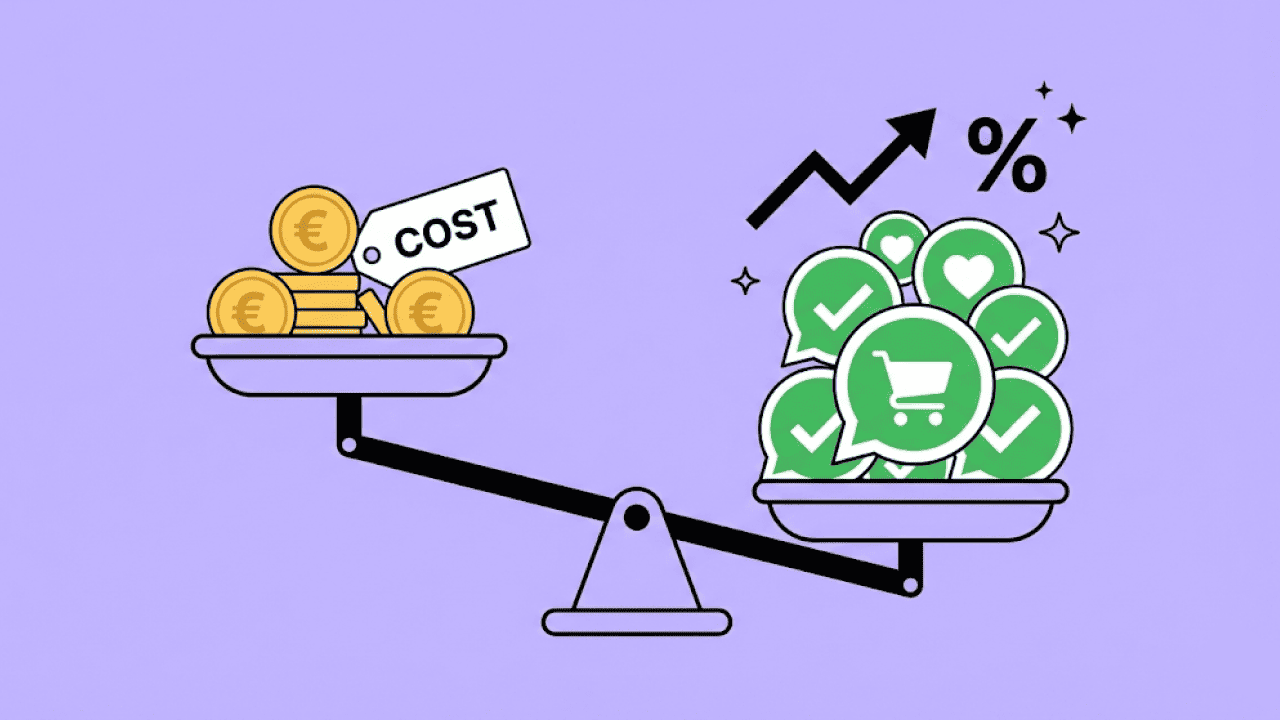
A WhatsApp newsletter costs Meta's fee per delivered message plus your provider's software. Meta bills marketing messages on a usage basis by recipient country, at €0.1131 per message in Germany. The same message costs €0.0490 to Austria and Switzerland, because both fall into Meta's "Rest of Western Europe" pricing region. Marketing remains the most expensive category, so cleanly segmented sending pays off.
| Category | Used for | Germany | Austria and Switzerland |
|---|---|---|---|
| Marketing | Newsletters, offers, launches | €0.1131 | €0.0490 |
| Utility | Shipping and order updates | €0.0456 | €0.0142 |
| Service | Replies to customer enquiries | First 1,000 per number and month free, then €0.0456 | First 1,000 per number and month free, then €0.0142 |
| Click-to-WhatsApp | Chats from ads | Free for up to 7 days, mobile app only | Free for up to 7 days, mobile app only |
Meta list prices in EUR per delivered message, excluding VAT, as of 1 October 2026. Source: Meta pricing documentation.
Since October 2026, Meta has charged service messages from the 1,001st per number and month at the utility rate. Chatarmin passes on Meta's fees 1:1 without any mark-up. Our article on WhatsApp newsletter costs covers all rates and sample calculations.
How many contacts can you message?
Meta's messaging limit determines how many contacts you reach per day. New business portfolios start at 250 recipients in 24 hours. One scaling step takes you to 2,000, after which Meta raises the limit automatically if quality is good.
Meta measures quality by blocks and spam reports. So send your first campaigns to your most engaged customers. The limit applies to the entire business portfolio, as our article on WhatsApp messaging limits explains.
Why does Meta reject your template?
Meta usually rejects templates for four reasons. You can spot most rejections yourself before submitting.
- Wrong category: As soon as a discount or a call to buy is included, the message belongs in the marketing category.
- Variable errors: Placeholders must be numbered consecutively, i.e. {{1}}, {{2}}, {{3}}.
- Variable at the start or end: A placeholder at the very beginning or end of the message often leads to rejection.
- Breach of the Commerce Policy: Stricter rules apply to products such as medicines or financial offers.
An example: "Hello {{1}}, your parcel is on its way {{3}}" gets rejected. "Hello {{1}}, your parcel with the number {{2}} is on its way." gets approved. If in doubt, choose marketing and keep the wording factual.
WhatsApp newsletter examples from e-commerce
Chatarmin customers ran these campaigns with WhatsApp newsletters. All figures come from the published case studies.
| Brand | Campaign | Result |
|---|---|---|
| Smilodox | Black Friday | €481,508 revenue in one weekend |
| bedrop | 4 days, 4 goodies | €163,983 revenue, 13.5x return on WhatsApp spend |
| waterdrop® | Two campaigns in 24 hours | 19.3x return, 78.8% open rate |
| Duschbrocken | One campaign | €60,619 revenue, 30.8x return |
Smilodox has now generated more than one million euros in revenue via WhatsApp. The fitness brand uses WhatsApp specifically for product drops, flash sales and seasonal promotions. Its Black Friday message shows how a strong WhatsApp newsletter is structured:
- Link to the shop at the very top.
- Headline with the core offer, here up to 70% off.
- Exclusive WhatsApp code that attributes every order to the channel.
- One button at the end that leads straight to the shop.
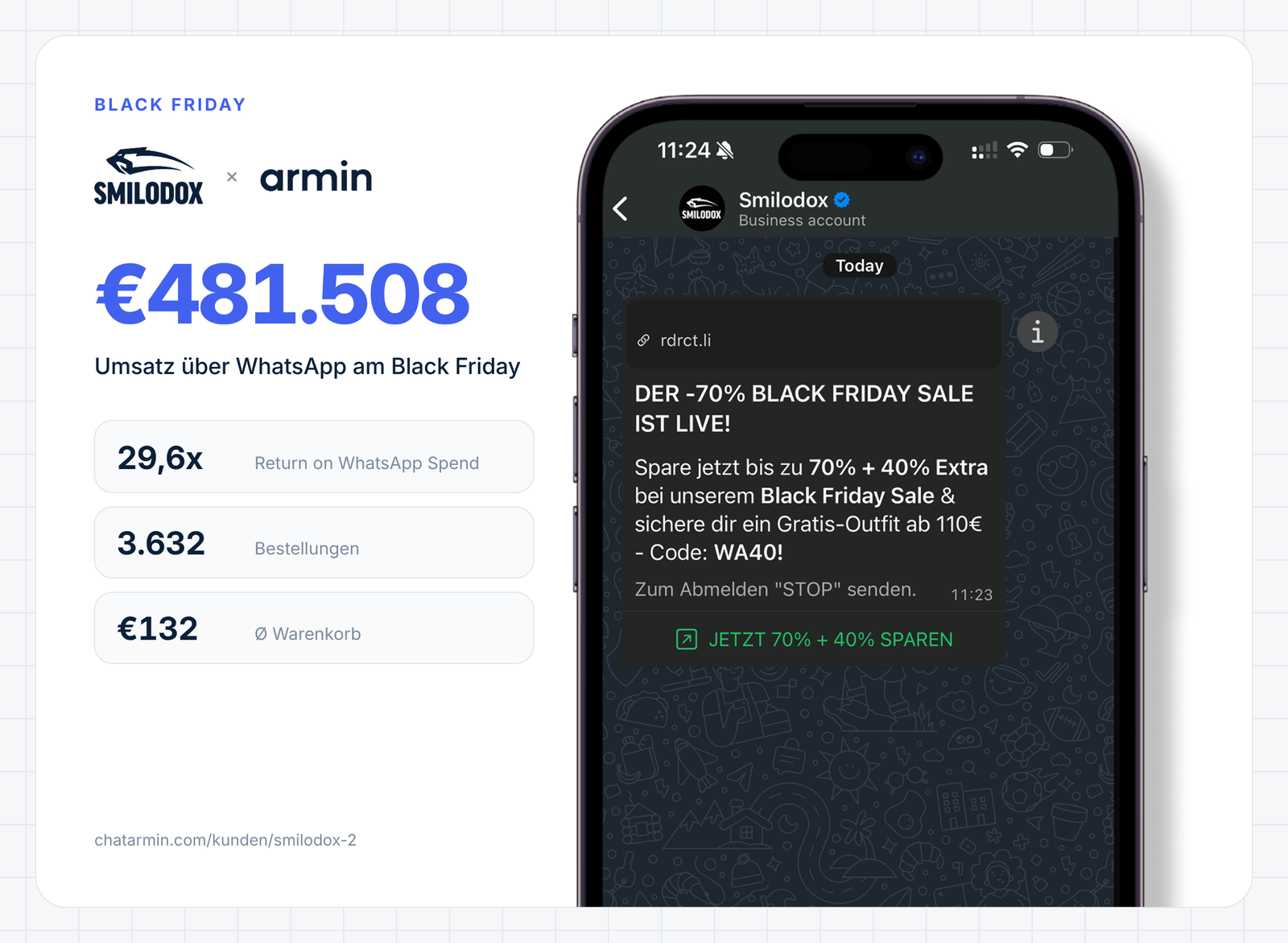
That weekend, revenue of €481,508 compared with costs of €16,263. One offer, one code and one button are enough for a strong campaign.
Which well-known brands send a WhatsApp newsletter?
Large retailers also use WhatsApp for offers and leaflets. The mechanics are almost always the same: a clear occasion, a short text and a link to the shop.
- Lidl sends its weekly leaflet via WhatsApp every Sunday, and customers sign up via a button on lidl.de.
- Snocks collects subscribers with a 10% discount and focuses on drops, restocks and early access.
- Edeka builds the channel through individual stores that send their offers via WhatsApp.
- Alternate signs up subscribers via double opt-in, and unsubscribing works by sending the message "Abmelden".
You will find more campaigns with screenshots and analysis in our WhatsApp newsletter examples.
Which tool do you need for your WhatsApp newsletter?
You need a tool that sends officially via the API and uses your shop data. Look for segments from Shopify or CRM, revenue tracking per campaign, flows and hosting in the EU. It also matters whether the provider adds a mark-up to Meta's fees. Our overview of WhatsApp newsletter providers offers a comparison.
When is a WhatsApp newsletter not worth it?
A WhatsApp newsletter only pays off once you have regular occasions for a campaign. With few orders per month, building opt-ins and paying Meta's fees often costs more effort than it brings in revenue. Long content such as guides is also better suited to email.
WhatsApp newsletter marketing complements email. Email remains your core channel, and you use WhatsApp for launches, drops and time-critical offers. Sync both channels so nobody receives the same message twice.
Conclusion: how to launch your WhatsApp newsletter
A WhatsApp newsletter runs via the API and needs opt-ins and a provider with a DPA and hosting in the EU. With a 72% median open rate and €1.03 revenue per message, it is a strong channel for launches and sales. Start with a small segment of your best customers and only increase the frequency once the numbers are right.
Plan your first WhatsApp newsletter with us in a demo. 15 minutes, free, with your numbers.
FAQ: frequently asked questions about WhatsApp newsletters
How do I create a WhatsApp newsletter?
You verify your business with Meta, connect your number via an official provider and collect opt-ins. Then you submit a template and send it to a segment.
Is a WhatsApp newsletter free?
No. Via the API, you pay a Meta fee per marketing message based on the recipient's country, €0.1131 in Germany. Your provider's software comes on top.
Can I send a newsletter with the WhatsApp Business app?
It depends. Broadcast lists reach up to 256 contacts who have saved your number, but opt-in management and data protection for customer marketing are missing.
Is a WhatsApp newsletter GDPR-compliant?
It depends. It is compliant if you use the API via a provider with a DPA and document every consent for WhatsApp.
What is the difference between a WhatsApp newsletter and a WhatsApp Channel?
A channel is a one-way street without customer data. A newsletter via the API arrives as a 1:1 chat, can be segmented and measures revenue per campaign.
How often should I send a WhatsApp newsletter?
Two to four campaigns a month have proven effective. More frequent messages increase blocks and lower your messaging limit.
How do customers sign up for my WhatsApp newsletter?
Via a pop-up, a checkout checkbox, a QR code or a chat link. What matters is separate, documented consent for WhatsApp.
Can I import contacts from Excel?
Yes. Via your provider, you import CSV or Excel lists, as long as there is consent for WhatsApp for every contact.
How do I get the verification badge for my business account?
Via the API, you apply for an official business account in Meta's WhatsApp Manager. Meta now shows the badge in blue, and it requires a well-known brand.
Is a WhatsApp newsletter worth it for B2B?
It depends. It works well for trade fair invitations, new products and appointments with existing customers, as long as your contacts have given consent.